Stats
Your site's key numbers, conversion rate, revenue, visitors and order size, against a benchmark period and next to the changes made on the site.
Four numbers that matter
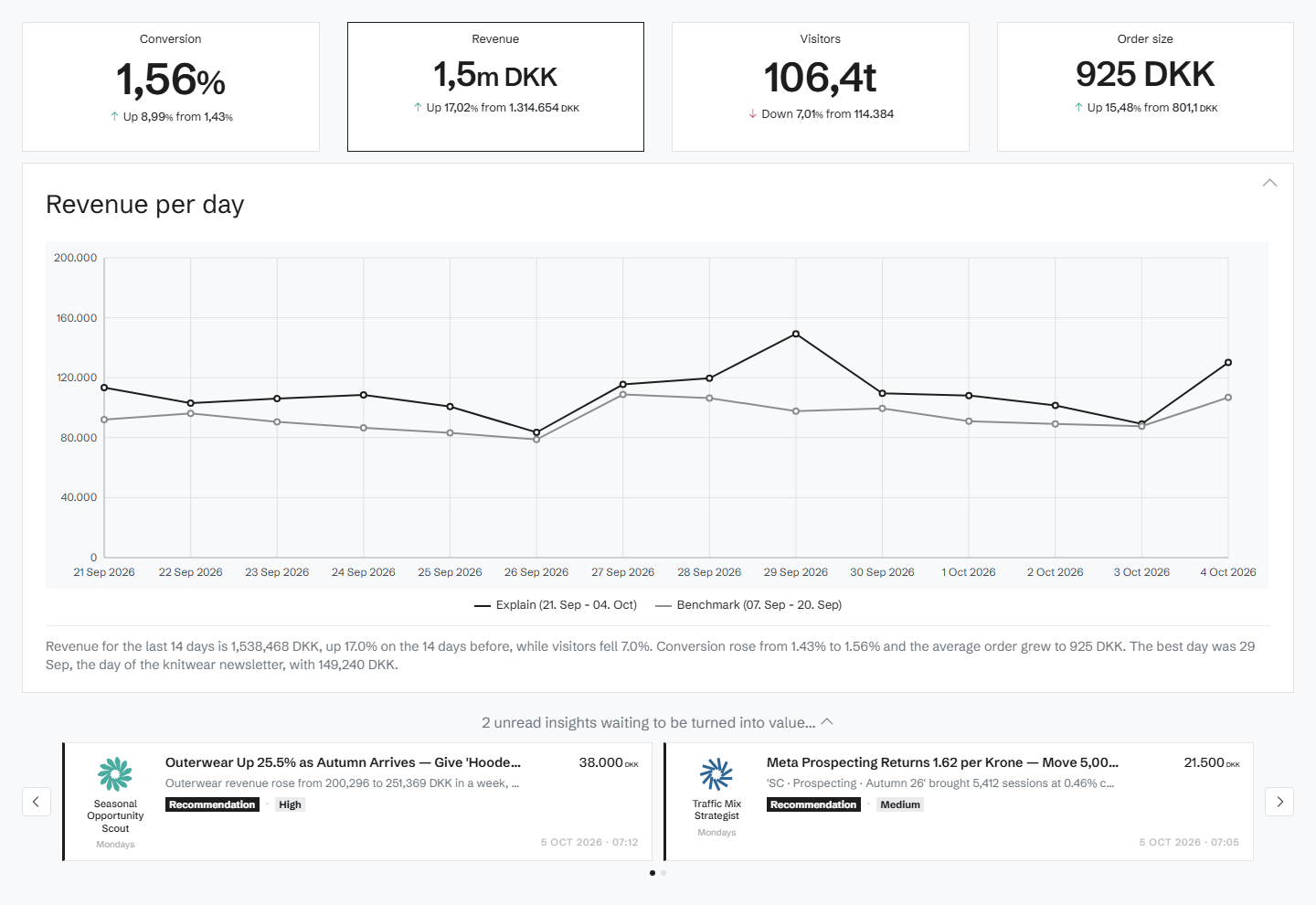
Conversion rate, revenue, visitors and order size, for the period you choose, each against a benchmark period so you see the change at a glance.
The trend, against its benchmark
A graph sets the period against the benchmark day by day. Pick a date to see the changes made on the site that day, so a jump in the numbers comes with the changes that may explain it.
From the total to the detail
The same numbers are broken down further on the pages for pages, products, tags, traffic sources and devices, all with the same benchmark, and Explain shows what drove a change.
Related features
All features →Explain
When a number moves, Explain breaks the movement down by products, traffic sources and devices, so you see what drove it.
Pages
Every page on your site with its revenue, conversion, visitors and orders against a benchmark, sorted by where the opportunity is biggest.
Products
Revenue, quantity sold, visitors and orders for every product, against a benchmark, with each product's price and availability as it was captured.
History and change detection
See your site exactly as it looked on any day since Historian started capturing it, with that day's numbers and the events around it.
Stop guessing why revenue dropped.
Book a demo and we'll show you what Historian finds on your own store.